Scheduling & inspection software for IDD residential providers
Group home software that keeps you inspection‑ready, runs your scheduling and automates call‑out coverage.
Built by former DSPs who’ve lived it.
14-day free trial · No credit card · From $49/home/month · Native iOS & Android apps



Your state's inspection checklist, built in
Every check comes from your state's licensing rules and the guidance its inspectors work from. Ask us about your state
How it works
- 1
Your state’s inspection checklist is already there.
From the day you sign up, every home has your state’s checklist. Nothing to build or set up.
- 2
Staff see the checks on their phone.
The checklist shows up in the staff app every shift. Managers log drills, fridge temperatures, vehicle checks and record reviews on schedule, with a reminder when something is overdue.
- 3
See ready or not ready.
Each home shows its open gaps, and builds an inspection packet when the inspector arrives.
DSPsystem records your own checks as evidence of process. It doesn't replace the records your state requires or guarantee an inspection outcome.

See It In Action
Watch the 3-Minute Overview
Want the full walkthrough? Watch the complete demo on YouTube.
Sound familiar?
When a DSP calls out at 2 AM, you shouldn't be the backup plan
A DSP calls out at 2 AM — and you're the one driving to the home to keep ratio.
You find out who's heading into overtime after it's too late to change the schedule.
The surveyor wants proof now, and it's somewhere in a binder.
Scheduling eats the hours you meant to spend supporting your homes.
How a call-out gets filled
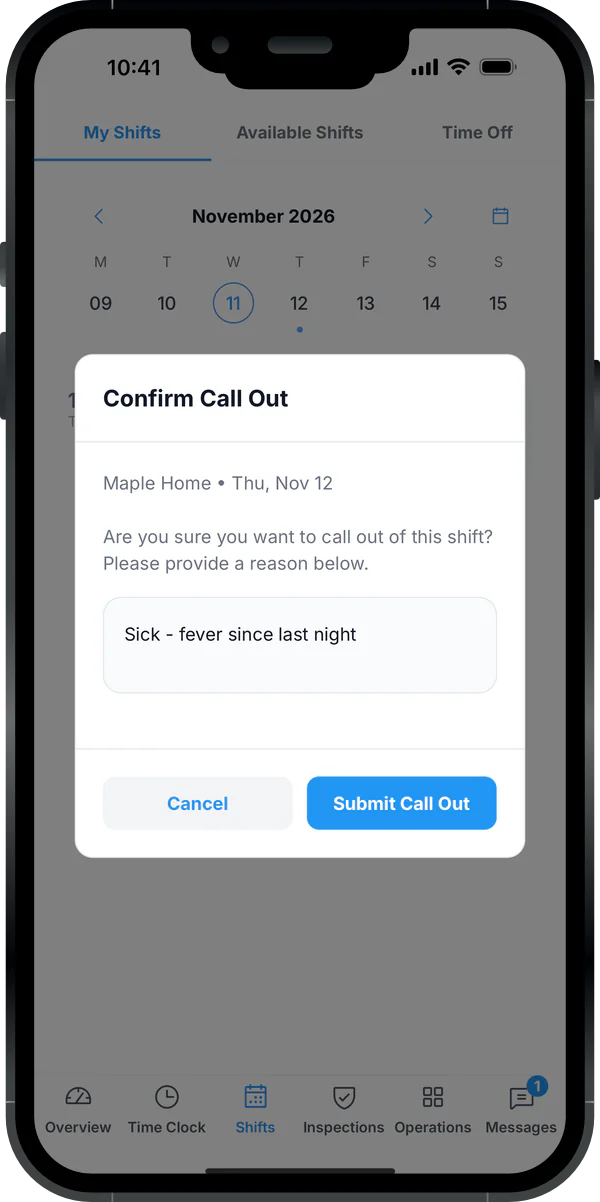
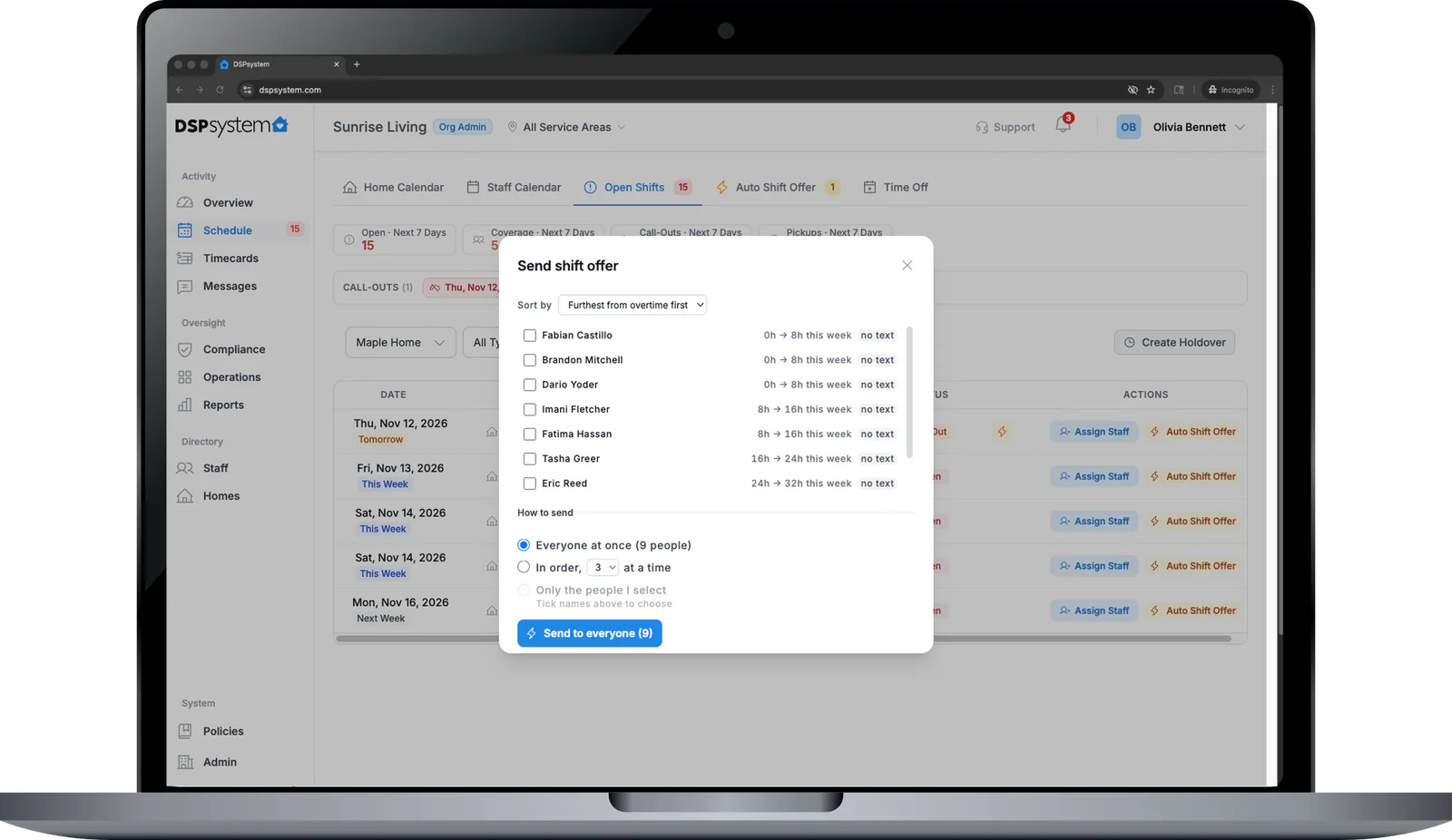
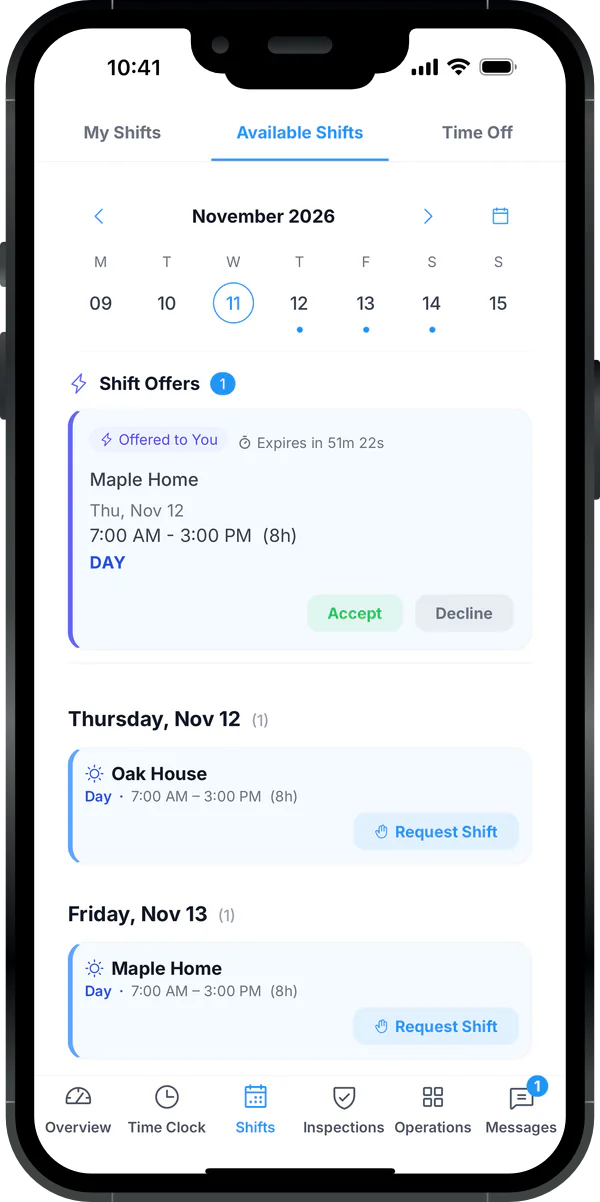
You stop calling down the list. DSPsystem offers the open shift to eligible staff on their phones, logs every attempt, and alerts you only if nobody picks it up.
- 1
A DSP reports the call-out in the app.
The open shift is created for that home straight away.
- 2
DSPsystem works out who is eligible.
Current certifications for that home, not already scheduled, not heading into overtime.
- 3
Offers go out in your priority order.
The first eligible DSP to accept gets the shift. If nobody does, you are alerted to step in.
Product Tour
Every home's coverage, timecards and compliance in one view

See every shift across every home — color-coded by type, with real-time coverage tracking.
- Recurring templates (daily, weekly, biweekly)
- Auto shift offer callout chains for open shifts
- Open shift marketplace for staff pickup
Staff Experience
Built for DSPs, Not Against Them
Your staff see their schedule, clock in, and pick up shifts — all from their phone in under 30 seconds.

Everything at a glance
Your shift progress, the day’s events, and inspection items due — all on one screen. Staff know exactly what needs attention right now.
Reports
14 One-Click PDF Reports
No more binder scrambles. Generate inspection-ready documents in seconds.
Shift Log Report
Complete shift history with staff names, times, notes, and status — per home or across your org.
Overtime & Labor Report
See who is approaching or exceeding OT thresholds before payroll runs. Daily, weekly, and 7th-day rules.
Compliance Summary
Every compliance item per home with status, due dates, and overdue flags — ready for inspectors.
Policy Acknowledgments
Track which staff have acknowledged mandatory policies. One-click proof for auditors.
Audit Trail
Every action logged — who did what, when, and where. Tamper-proof accountability.
Training Grid
Certification matrix showing every staff member vs. every requirement — instant audit readiness.
Survey-Ready Packet
One-click export of all compliance, certifications, and home data formatted for state inspections.
Plus 7 more reports including PTO balances, time-off usage, shift coverage, and home inspections.
Our Story
Built by People Who Lived the Chaos
We built DSPsystem because we lived the chaos — first as Direct Support Professionals working the floor, then as the ones managing schedules, tracking certifications, and scrambling for coverage at 2 AM. We've been on both sides: the staff member picking up overtime because no one else would, and the manager juggling spreadsheets, phone trees, and paper binders trying to keep a home in compliance before the inspector knocked.
We knew there had to be a better way — but every tool we found was either built for hospitals, priced for enterprises, or completely clueless about how group homes actually work. So we built DSPsystem: the platform we wished existed when we were running the homes.
“The platform we wished existed when we were running the homes.”
Why DSPsystem
Built for IDD group homes, not retrofitted from retail scheduling
Purpose-built for IDD residential providers — not retrofitted from generic tools.
| Feature | Generic Tools Retail & restaurant shift apps | Enterprise Large home-care & EHR suites | DSPsystem |
|---|---|---|---|
| Home-based scheduling | |||
| Certification enforcement | |||
| Auto shift offer callout chains | |||
| Inspection-ready reports | |||
| Mobile GPS clock-in | |||
| Holdover & mandate tracking | |||
| Per-home compliance tracking | |||
| Policy manager & acknowledgments | |||
| Time-off & PTO accrual | |||
| Shift checklists | |||
| Emergency preparedness | |||
| Staff fatigue & risk flags | |||
| Missed clock-in alerts | |||
| Timecard dispute workflow | |||
| Staff app built for phones | |||
| Setup time | Varies | Varies | Same day with CSV import |
| Price | Usually priced per user | Usually a custom quote | $49/home/mo |
The only purpose-built, affordable workforce platform for IDD group homes.
The math, with the assumptions shown
One avoided citation can cover a year for 6 homes. One avoided overtime shift a month covers a home
Up to $10,000
for one citation, the top of the published range
- California: $1,000–$10,000 per citation. Health & Safety Code §1424 (Class A citation, ICF/DD facilities).
- North Carolina: $500–$10,000 per violation. G.S. 122C-24.1 (Type A1 violation, facilities serving 6 or fewer).
4 homes
Pro for 4 homes, a year: $6,432 ($1,608 per home, billed annually). A year for 4 homes is 64% of one $10,000 citation.
≈ $204
for one overtime shift
8 hours × $17/hr DSP wage × 1.5 overtime. Example call-outs: 8 a week × 30 minutes of phone calls each is 4 hours a week.
Examples from published statutes and stated assumptions, not guarantees or measured customer results. Fines vary by state and violation. Plug in your own wage and call-out numbers.
Pricing
Simple per-home pricing
Scheduling, clock-in and compliance on every plan. Higher plans add tools for larger teams and more hands-on setup. 14-day free trial, no credit card required.
Up to 3 homes? Start with Starter. More homes, service areas or faster support? Pro.
Starter
Every feature for operators with up to 3 homes.
$49/home/month
for your first 12 months, then $69/home/mo
+ $199 one-time setup, waived with annual prepay
14-day free trial
Support
- Every operational feature included
- 300 text messages per home per month
- Up to 3 homes, unlimited staff per home
- Email support, reply within 2 business days
Pro
Unlimited homes
Every feature, unlimited homes and service areas, faster support.
$149/home/month
for your first 12 months, then $249/home/mo
+ $499 one-time setup, waived with annual prepay
14-day free trial
Support
- Every operational feature included
- 800 text messages per home per month
- Unlimited homes
- Service areas and Program Director role
- Reply within 4 business hours
- Phone support
Enterprise
For large providers with IT, security or contract requirements.
Contact us
Support
- Everything in Pro: unlimited homes
- Service areas and Program Director role
- SSO, API access and white-label branding, as available
- Custom contract and security review
- Dedicated support
Included in Starter and Pro
- Shift scheduling with recurring templates
- GPS clock in/out with grace periods
- Call-out management & tracking
- Automatic shift offers
- Open shift offers & pickup requests
- Team messaging & shift handoff notes
- Holdover & mandate tracking
- Timecard management & approval
- Payroll & timecard export
- Overtime rules (daily, weekly, 7th day)
- Home compliance tracking & inspections
- Staff certification & expiry tracking
- Survey-ready compliance packet export
- Policy manager with staff acknowledgements
- Emergency preparedness & drill logging
- Shift checklists & task tracking
- Facility logs & maintenance records
- Multi-step approval workflows
- Advanced analytics & call-out trends
- Smart scheduling suggestions
- Audit logs for all actions
- Full data export (CSV/ZIP)
- Unlimited staff per home
All plans include a 14-day free trial. No credit card required to start.
Pay annually and save about 10%, and we waive the one-time setup fee.
Reply times are targets, measured in business hours: Monday to Friday, 9 AM to 5 PM Pacific, excluding US federal holidays.
Founding rate applies to new customers who subscribe by March 31, 2027, for the first 12 months of the subscription. After that, the standard rate shown on each plan applies. We will email you 30 days before your rate changes.
FAQ
Questions program directors ask before switching
Ready to Stop Being the 2 AM Backup Plan?
14-day free Pro trial. No credit card.